

由 STREAMLABS VISION 提供技術
Streamlabs Sidekick
這款 Intelligent Streaming Agent 可身兼您的虛擬共同主持人、直播製作人與技術支援,協同運作,讓您專注於創作。

直播製作人
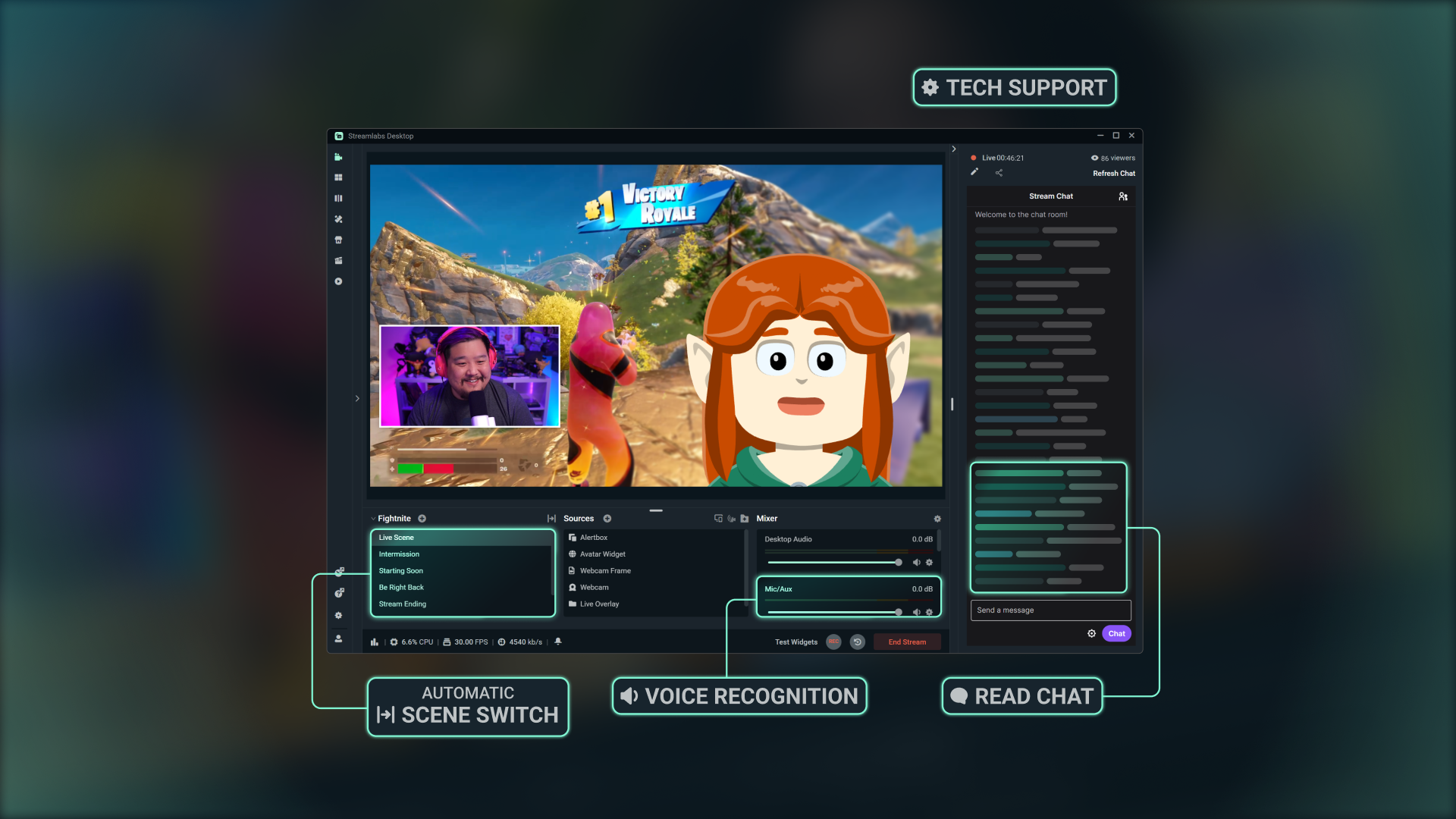
使用簡單的語音指令切換場景、控制音訊、與聊天室互動、進行解說等,完全不必動手。
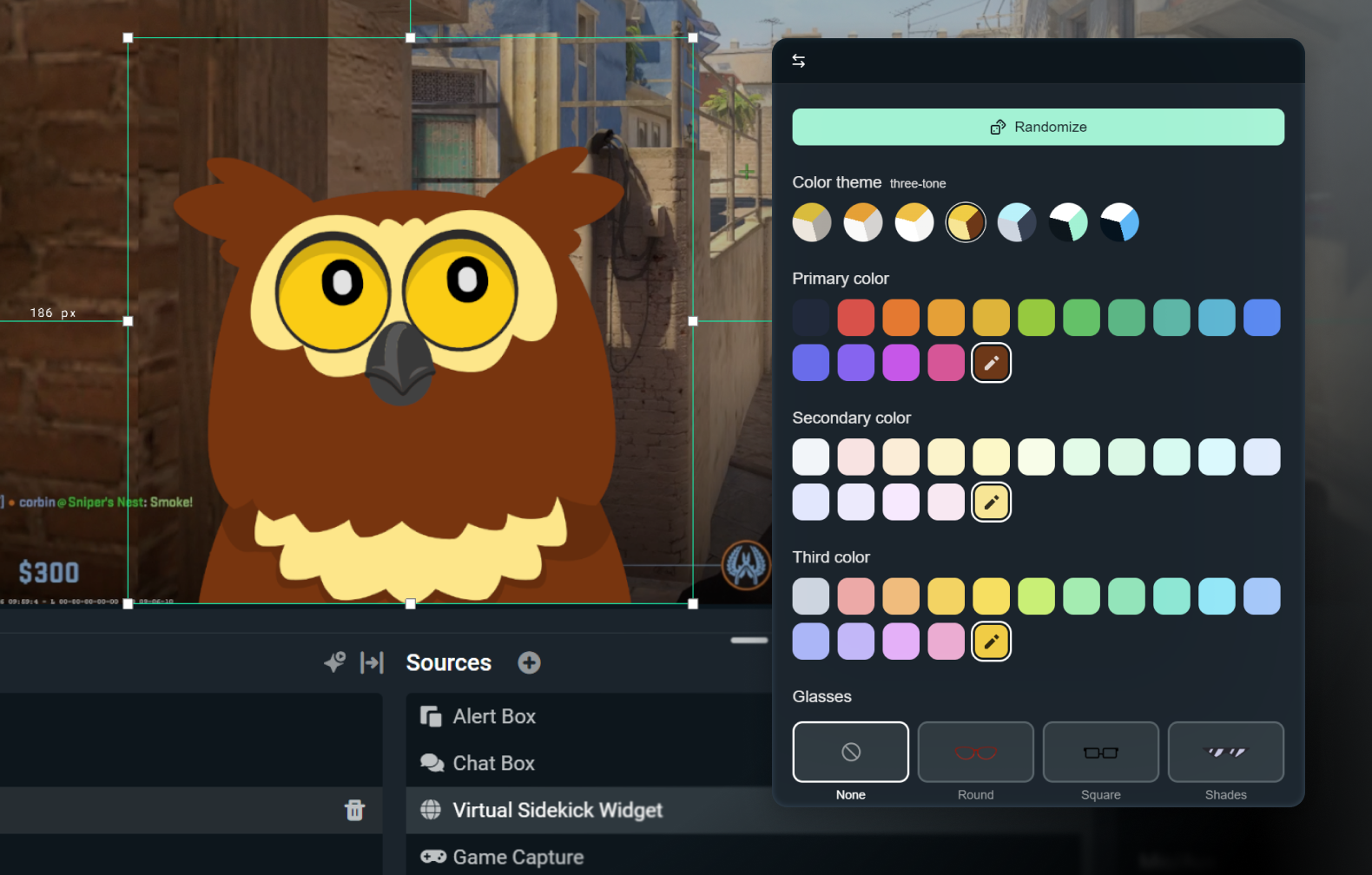
自訂您的 2D 或 3D 頭像
啟用僅語音模式,低調呈現;或使用 3D 或 2D 頭像,讓它栩栩如生。 2D 頭像讓您能在螢幕上顯示 Sidekick,同時不會對 CPU 造成太大負擔。
使用您選擇的配件、名稱和聲音自訂頭像。

技術支援
即時疑難排解,讓您專注於直播,而非設定調整。
採用頂尖 AI 技術打造
採用 NVIDIA 與 Inworld 技術開發,打造逼真的 3D 頭像與即時智慧功能。
使用方式
在 Streamlabs Desktop 上安裝該應用程式。僅選擇螢幕顯示或背景模式的 Sidekick。
自訂設定,並選擇符合您品牌風格的 2D 或 3D 頭像。
照常直播,Sidekick 會協助您切換場景、提供討論主題、技術支援等,讓您專注於觀眾。
簡單、按使用量計費的存取方式
免費
總共 100 次互動
Sidekick 頭像
共同主持人與技術支援功能
Ultra
每月 1,000 次互動
優先使用權(視可用情況而定)
Ultra Plus
每月 5,000 次互動
優先使用權(視可用情況而定)
主要規格
共同主持人、製作人與技術支援功能皆在本機執行,對系統的影響極小 (內部測試約使用 3% GPU)。選用的 3D 頭像需要額外資源,但 2D 頭像的影響較低。
《Fortnite》、《Valorant》、《PUBG》以及《Counter-Strike 2》皆已全面支援。
敬請期待更多遊戲的支援。
在直播中使用 3D 或 2D 頭像,或以背景模式執行 Sidekick,當一個全程安靜的助理。

以 Streamlabs Vision 建構
稱為 Sidekick 的 Intelligent Streaming Agent 由 Streamlabs Vision 這款強大的即時 AI 模型提供支援。開發者可利用相同的視覺、語音與自動化模型,為全球直播者打造全新互動體驗。
常見問題解答
Sidekick 是我們的智能直播助手,也是内置于 Streamlabs Desktop 的虚拟联合主持人、直播节目制作人和技术支持助理。它透過語音指令協助製作任務、與觀眾互動,並監控直播狀態,讓您能專注於創作內容。
不需要。虛擬角色為選用功能。您可以在背景模式下使用 Sidekick 作為製作人或技術助理。
這些遊戲支援 Sidekick:
- 7 Days to Die
- 《Apex 英雄》
- ARC Raiders
- Arena Breakout:Infinite
- Battlefield 6
- Bloodborne
- Call of Duty:Black Ops 6
- Call of Duty:Black Ops 7
- Call of Duty:Modern Warfare 4
- Call of Duty:《現代戰域》
- Counter-Strike 2
- Dark Souls Remastered
- Dark Souls II
- Dark Souls III
- DayZ
- Dead by Daylight
- Deadlock
- Delta Force
- Dota 2
- EA Sports FC 26
- Elden Ring
- 霧鎖王國
- Escape From Tarkov
- F1® 25
- Fortnite
- Forza Horizon 6
- Halo Infinite
- Helldivers 2
- Heroes of the Storm
- Hunt:Showdown 1896
- 《英雄聯盟》
- Left 4 Dead 2
- Madden NFL 27
- Marathon
- 《漫威爭鋒》
- Minecraft
- Mortal Shell 2
- NBA 2K26 + 2K27
- 《鬥陣特攻 2》
- Palworld
- Path of Exile 2
- PUBG:BATTLEGROUNDS
- Rocket League
- Rust
- Sekiro:Shadows Die Twice
- Teamfight Tactics
- Tom Clancy's Rainbow Six Siege X
- Valheim
- 《特戰英豪》
- 《戰爭雷霆》
- Wardogs
- World of Warcraft:Solo Shuffle
我們將持續擴大支援的遊戲,請隨時回來查看最新更新!
是的,但有限制。 AMD GPU 不支援螢幕上的頭像。不過,所有其他功能 (如僅音訊模式等) 仍可正常使用。
是的。免費方案僅支援有限的互動與自動化功能。 Ultra 和 Ultra Plus 可解鎖更高的使用額度,專為想要更高互動上限的實況主打造。
互動指的是 Sidekick 的任何回應,無論是文字或語音。例如,當您在聊天中輸入問題時,Sidekick 的回覆即算作一次互動。如果您要求 Agent 切換場景,也會算作一次互動——但若是透過自動化執行且虛擬角色沒有回應,則不會計算。像是單純切換場景或剪輯精彩片段等操作,除非 Sidekick 以文字或語音回應,否則本身不算互動。
不需要。計數器會在每個日曆月開始時重置。
是的,您可以從各種頭像中進行選擇,並自訂個人特色與外觀,使其符合您的品牌形象。
以下為使用螢幕上 3D 虛擬角色的最低系統需求。如果您是以純語音模式使用 Sidekick,或是使用我們的任何 2D 虛擬角色,您只需符合 Streamlabs Desktop 最低系統需求即可。
單一 PC 設定
- GPU:
- NVIDIA GeForce RTX™ 3090、3090 TI、5090 或以上
- Quadro RTX™ 4000 或以上
- TITAN RTX™
- VRAM:完整工作負載 (代理程式 + 虛擬角色 + 製作) 需 24GB
- 作業系統:Windows 11
- 驅動程式:建議您隨時安裝最新的 NVIDIA Game Ready 驅動程式。
雙 PC 設定
- GPU:
- NVIDIA GeForce RTX™ 3060、3080、3080 Ti、3090、3090 Ti、4070、4070 SUPER、4070 Ti SUPER、4080 SUPER、4090、5070、5070 Ti、5080、5090 或以上
- Quadro RTX™ 4000 或以上
- TITAN RTX™
- VRAM:12GB
- 作業系統:Windows 11
- 驅動程式:建議您隨時安裝最新的 NVIDIA Game Ready 驅動程式。
如果您需要協助查看您有多少 VRAM,請在這裡參考我們的指南。
請透過此連結聯絡支援人員。